
Why Use Our Facebook Video Downloader?
- 100% free & no registration — no need to create an account or install anything.
- Works on all devices — iPhone, Android, Windows, Mac, tablet. Compatible with all major browsers (Chrome, Safari, Edge, Firefox, etc.).
- Multiple formats & quality options — MP4, MP3, MOV, AVI, WMV and more. Choose SD, HD, Full HD (depending on the original), or audio-only (MP3).
- Unlimited downloads — no daily limit, no hidden payment walls.
- No hosting, no storage — videos are fetched from Facebook CDN and delivered directly to your device; nothing is stored on our servers.
- Fast and simple — copy the video URL → paste → click “Download” → select format → save. Perfect for offline viewing, backups, sharing.


How to Download Facebook Videos (Step-by-step)
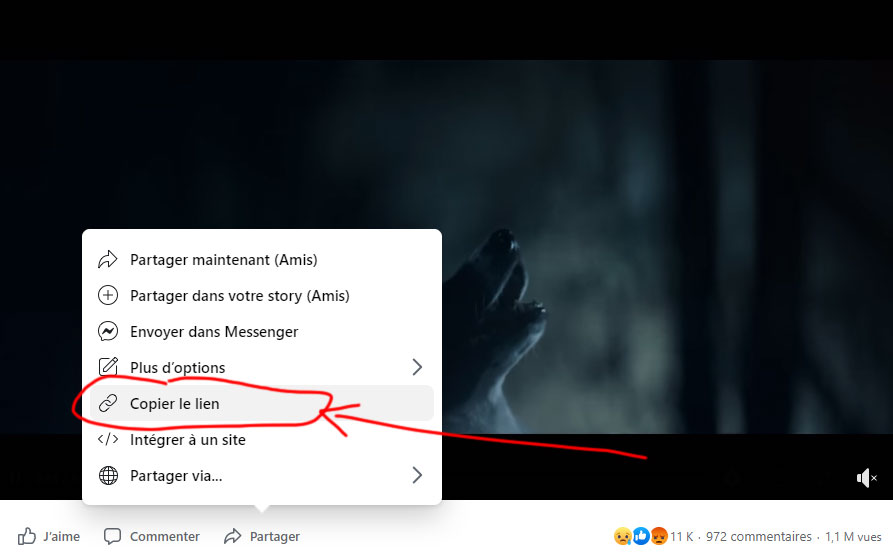
Copy the Facebook video URL
- On desktop: open the video → copy the URL from address bar.
- On mobile (browser or app): tap “Share” → “Copy link”.
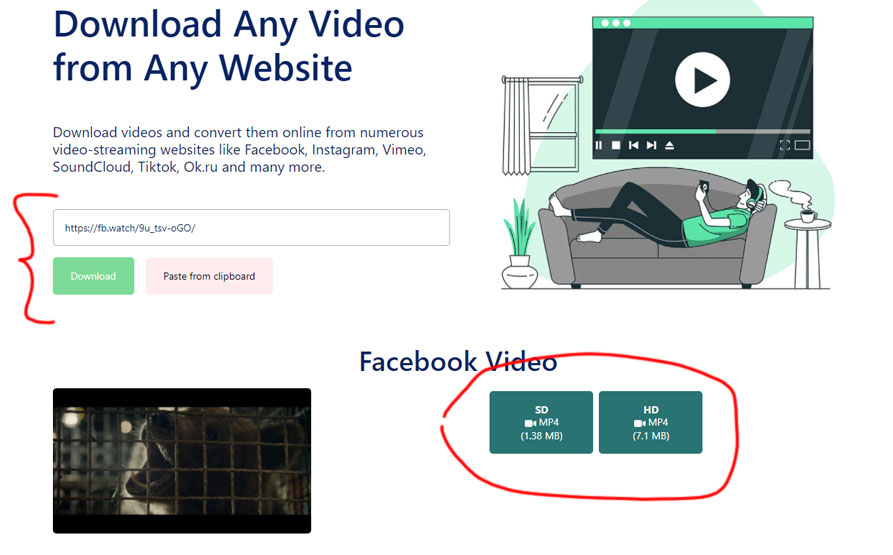
Paste the link into the downloader box at the top of the page.
- Wait a moment while our server processes the link — typically 1–3 seconds.
Choose video format & quality
- If HD or Full HD is available, select it; otherwise SD.
- Optionally choose audio-only (MP3) if you just need sound.
Click “Download” and save the file to your device
- On desktop: video saved to your browser’s default downloads folder.
- On mobile: saved to “Downloads” or your phone’s default folder.
Note: If the download doesn’t start, right-click (or long press on mobile) and select “Save as…” to force the download.
What to Know About Video Quality & Format
Quality depends on original upload — if the Facebook video was uploaded in SD, you cannot get HD.
HD / Full HD only if available — choose highest quality if available; otherwise you’ll get SD.
Audio-only download — good for audio-based content (podcasts, talks); choose MP3 format.
File size & storage — HD/full HD videos can be large (tens to hundreds of MB). Make sure you have enough space.
Legal & Ethical Reminder – Use Responsibly
This tool is designed for personal use only (offline viewing, private archiving).
Do not download videos for redistribution, commercial use, or re-uploading without permission of the content owner — this may infringe copyright laws.
Respect privacy settings: if a video is private or in a closed group, it might not be downloadable (or may violate terms).
We do not host, store, or distribute videos — we only provide a mechanism to retrieve an existing public video for personal use.